NanoBot
The AI Agent That Fits in Your Pocket
NanoBot on OpenClaw brings the full power of autonomous AI agent technology down to its minimal, auditable essence. Built on a ~4,000-line Python core, NanoBot delivers persistent memory, multi-platform messaging, tool execution, and cron automation — with a 45 MB footprint that runs on a Raspberry Pi. No cloud required. No bloat tolerated.
What is NanoBot?
NanoBot is an ultra-lightweight autonomous AI agent built on the principle that less is more. Where other frameworks ship hundreds of thousands of lines of code, NanoBot keeps its entire core under 4,000 lines — small enough to read, audit, and deeply understand over a weekend. That minimalism isn't a compromise. It's a deliberate architectural decision that makes NanoBot faster to start, more predictable in production, and dramatically easier to customize than any enterprise-grade alternative.
On AiBotClaw, NanoBot runs as a fully managed service. You get all the advantages of a self-hosted AI agent — full data privacy, no vendor lock-in, complete control over your AI model choices — without the operational burden of managing servers and updates yourself. NanoBot connects to the messaging apps you already use, remembers your preferences across sessions, executes real-world tasks, and operates 24 hours a day on hardware as modest as a single-board computer.
Inspired by academic research into minimal agent runtimes, NanoBot is designed as a "kernel layer" for personal AI: a stable, minimal core that any developer can extend — similar to how Linux provides the kernel without shipping every driver. Curious how it stacks up against heavier frameworks? You can compare NanoBot with OpenClaw on our dedicated page to understand which fits your needs better.
Key Features of NanoBot
Ten core capabilities that make NanoBot a serious autonomous AI agent for personal and team use
Multi-Channel Messaging
Connect one NanoBot instance to Telegram, Discord, WhatsApp, Slack, Feishu, DingTalk, QQ, and Email simultaneously. Your NanoBot is wherever you actually are — no separate bots per platform.
15+ LLM Providers
NanoBot works with OpenAI GPT, Anthropic Claude, Google Gemini, DeepSeek, Groq, OpenRouter, and any OpenAI-compatible local endpoint — Ollama, LM Studio, llama.cpp. Switch models per agent without reconfiguring everything.
Persistent Long-Term Memory
NanoBot stores long-term context in a plain-text memory file and injects it at every session start. It genuinely remembers your preferences, project context, and habits across weeks and months — no database needed.
Tool Execution Engine
Five tool categories built in: file operations, shell command execution, web browsing, modular skills, and MCP servers. NanoBot executes real tasks — it doesn't just answer questions.
Cron Task Scheduler
Standard cron syntax for time-based automation. NanoBot fires scheduled jobs autonomously — no user message required. Jobs persist across restarts and trigger the agent proactively like a production service.
MCP Protocol Support
Model Context Protocol integration lets NanoBot consume any MCP-compliant external tool server with zero custom integration code. The growing MCP ecosystem — file systems, databases, APIs — is instantly available to every NanoBot instance.
Sub-Agent Architecture
NanoBot can spawn independent parallel agent sessions for complex multi-step tasks. Each sub-agent runs in complete isolation with its own context and reports results back to the main NanoBot session.
Voice Message Transcription
Voice messages received via Telegram are automatically transcribed to text using Whisper before being processed by NanoBot. Just speak — NanoBot listens, transcribes, and acts without you typing a word.
Security Sandboxing
All NanoBot file operations are confined to a workspace directory. Configurable allow/deny patterns restrict which shell commands the agent can run. An iteration cap prevents runaway agent loops before they cause any harm.
Modular Skills System
Extend NanoBot by dropping skill files into the skills directory — no core code changes required. Adding a new capability to NanoBot typically takes under 30 minutes. The architecture is designed to be modified by real humans.
NanoBot Live Demos
Real NanoBot sessions — watch it search, write code, recall memory, and fire scheduled tasks autonomously
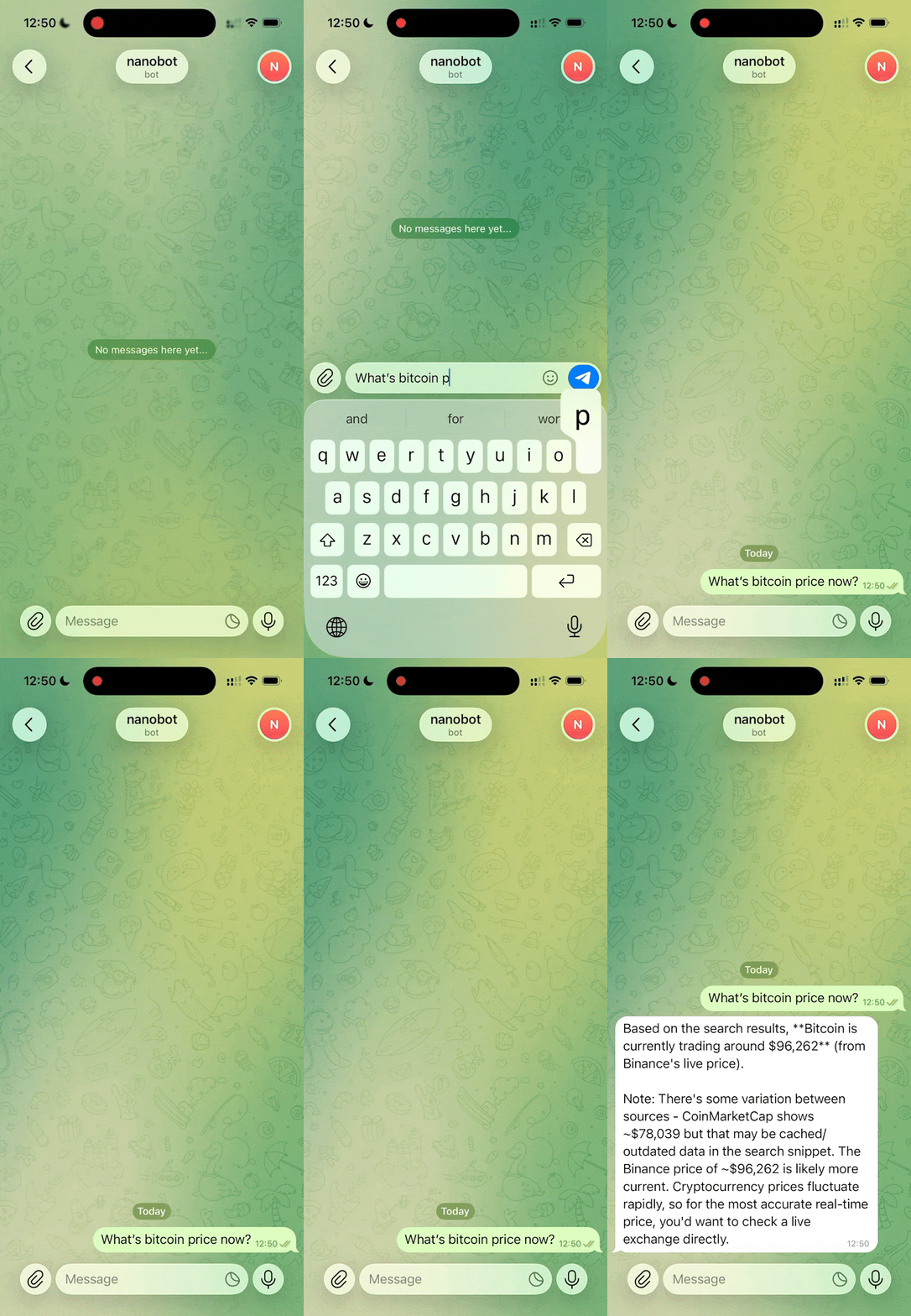
🔍 Web Search & Research
NanoBot autonomously searches the web, fetches pages, and synthesizes findings — no user prompt needed after the initial setup.
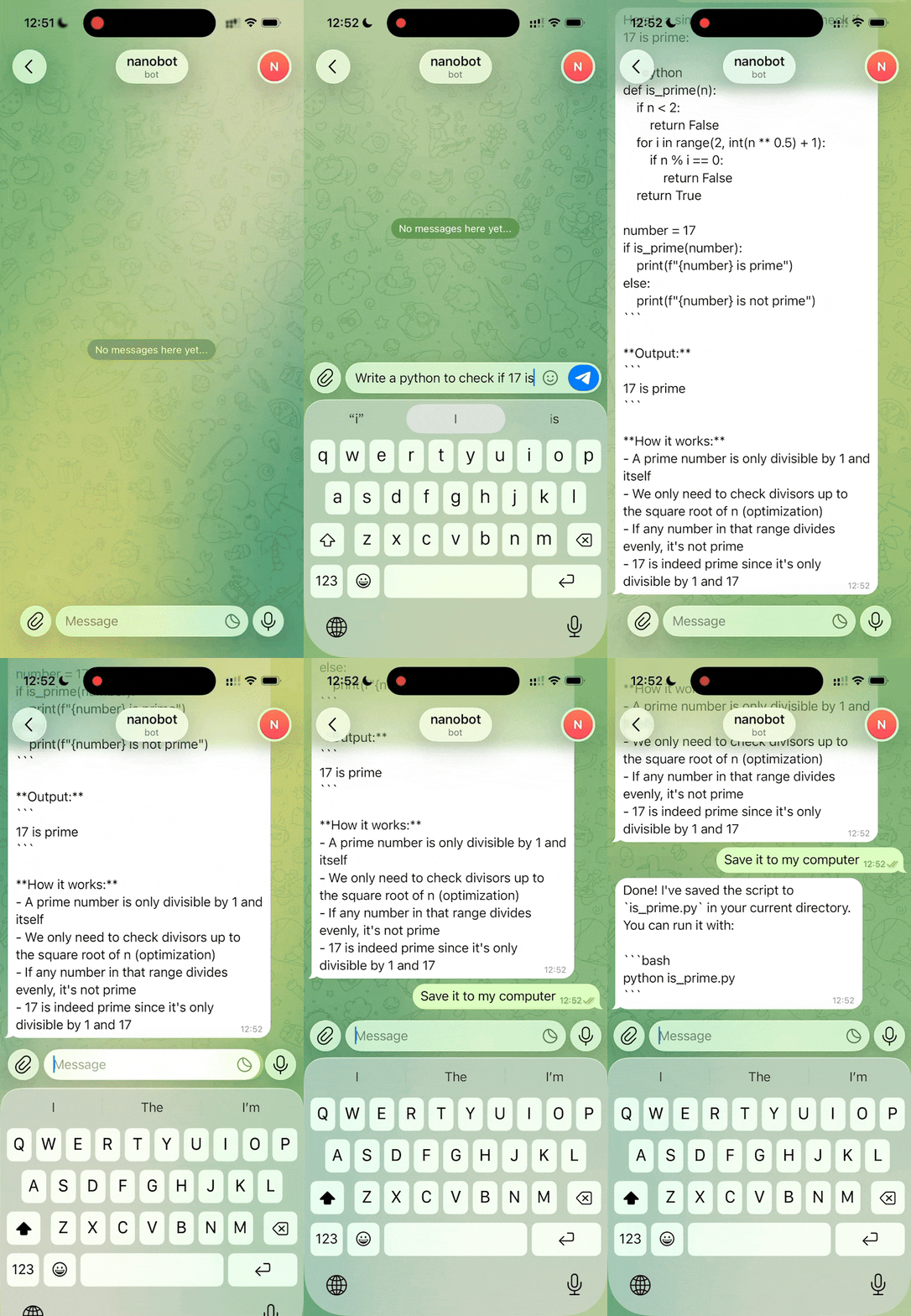
⚙️ Code Execution
From writing shell scripts to running Python programs, NanoBot handles real code tasks with full sandboxed tool access.
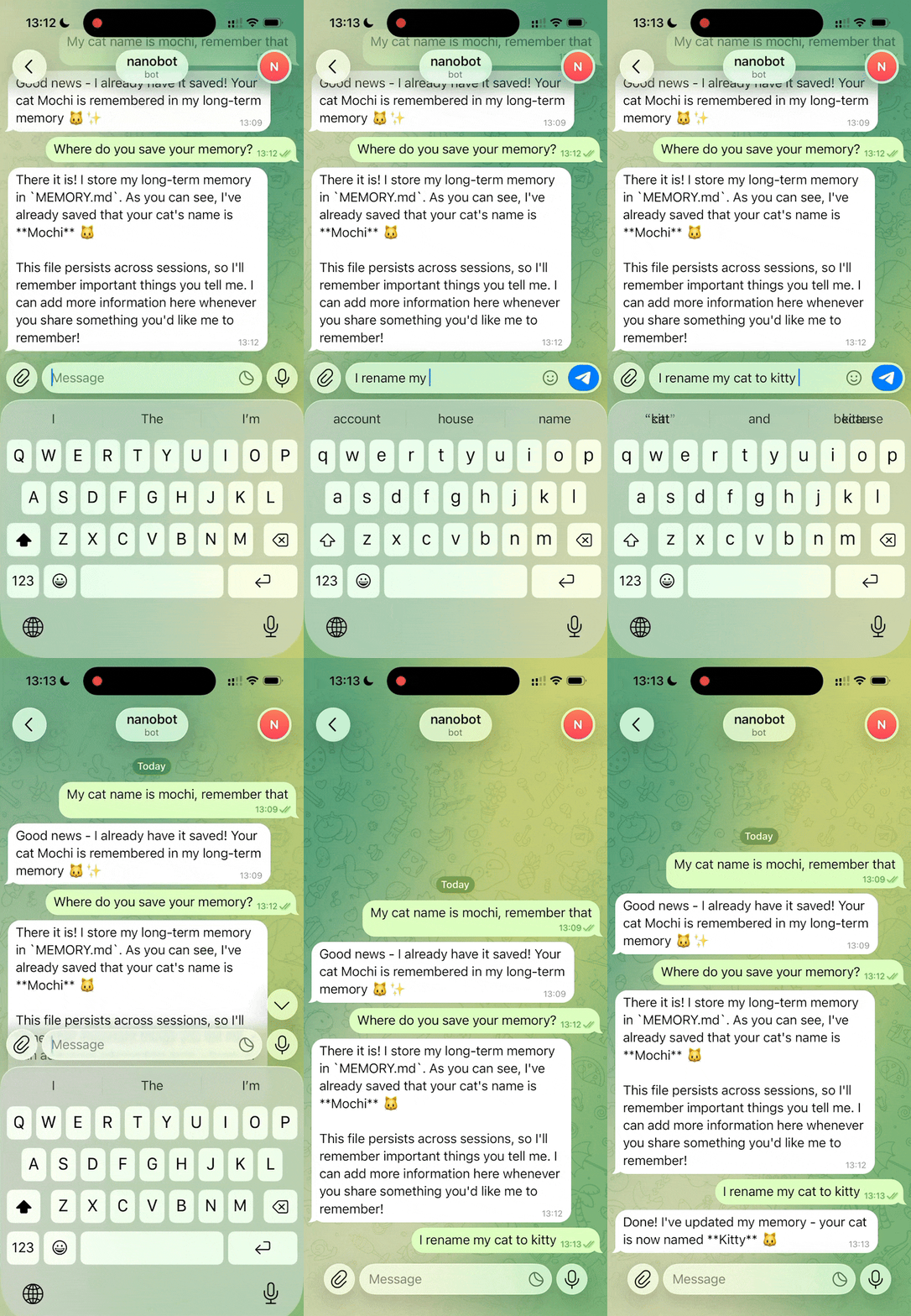
🗃️ Persistent Memory
NanoBot reads and updates plain-text memory files, building a growing knowledge base of your preferences and past context.
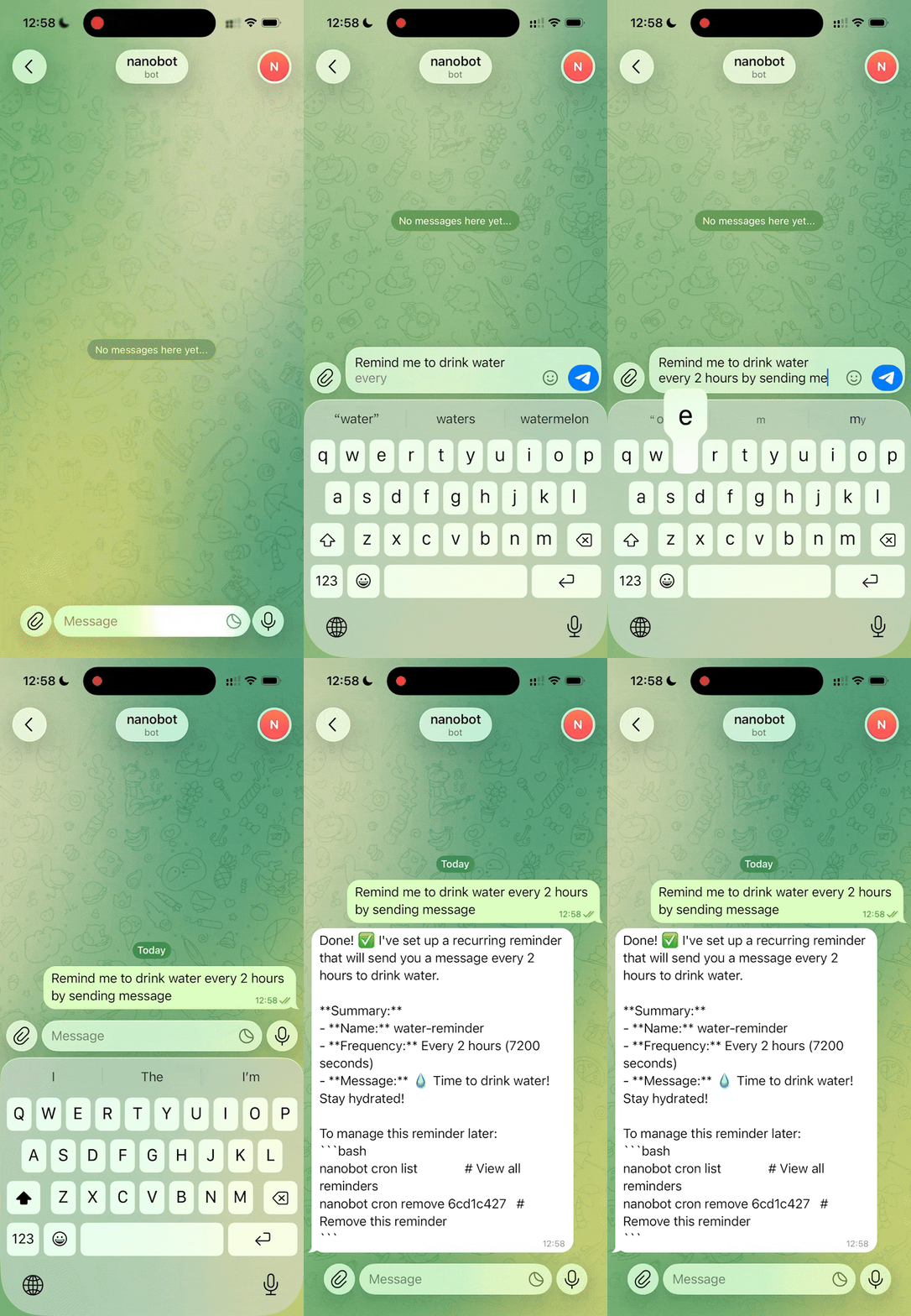
⏰ Scheduled Automation
Standard cron syntax schedules NanoBot to fire proactively — morning briefings, alerts, reports, all happening without you typing a thing.
No Downloads — Run NanoBot Online
With AiBotClaw, you don't install NanoBot on your personal machine. The agent runs on your configured server or AiBotClaw infrastructure while you manage everything from a clean web dashboard. Your laptop stays light; your NanoBot stays on 24/7.
This is the core advantage of running NanoBot through AiBotClaw: you get the privacy and control of a self-hosted AI agent without any of the operational overhead. No Python environment to maintain, no dependency conflicts, no late-night alerts because a package decided to break itself.
- No local Python setup or dependency management required
- NanoBot runs continuously — survives laptop sleep, reboots, travel
- Access your NanoBot configuration from any browser, anywhere
- Your data stays on your designated server — never on AiBotClaw servers
- Automatic NanoBot version updates applied without downtime
- One dashboard to manage multiple NanoBot agent profiles
Create an AiBotClaw account
Sign up and pick a NanoBot hosting plan. The whole setup completes in well under 2 minutes.
Configure your LLM provider
Paste your API key (OpenAI, Anthropic, Groq...)
Connect messaging platforms
Add Telegram bot token, Discord webhook, or WhatsApp credentials. NanoBot validates the connections automatically.
Start your NanoBot
Hit Start. NanoBot boots in under a second — memory loaded, channels connected, cron jobs scheduled and running.
NanoBot Artwork Showcase
Inside NanoBot — live terminal session, agent architecture diagram, and persistent memory system
GitHub repos: my-app, research-tools
Morning briefing: 8am via Telegram
Default model: claude-3-5-sonnet
Language: English / Spanish ok
Workspace: /home/user/projects
Reminder: 15:00 set
PR reviewed: my-app#42
Todo: follow up with team at 5pm
GitHub issues triaged — 7 items
Email batch drafted and sent
Platforms & AI Models
NanoBot connects where you already are — and uses the AI model you actually prefer
📱 Messaging Platforms
🧠 AI Model Providers
Latest NanoBot Innovations
Recent additions that push NanoBot's autonomous capabilities even further — you can also explore all AiBotClaw platform features for a wider picture.
MCP Server Integration
NanoBot now natively consumes any Model Context Protocol-compliant tool server. Connect file systems, databases, GitHub, or custom APIs without writing a single line of integration code. The growing MCP ecosystem is instantly available to every NanoBot instance running on AiBotClaw.
Parallel Sub-Agent Execution
For complex multi-step workflows, NanoBot can now spawn isolated sub-agent sessions that run concurrently. A research sub-agent, a data-analyst sub-agent, and a writing sub-agent can all work in parallel — each NanoBot reports results back to the primary session.
Extended Reasoning Mode
For compatible LLM providers — including Claude and DeepSeek R1 — NanoBot now supports extended reasoning mode, enabling deeper multi-step thinking before producing output. Complex analysis tasks that previously needed multiple prompts now complete in a single NanoBot request.
Whisper Voice Transcription
Voice messages sent to NanoBot via Telegram are now automatically transcribed using OpenAI Whisper before being processed by the agent. Dictate tasks on the go — NanoBot hears, understands, and executes without you needing to type a single character.
Advanced NanoBot Techniques
Practical tips drawn from the NanoBot community — the kind of things you only learn after running it for a while
⚙️ Setup & Performance
- A working NanoBot assistant is configurable in under 2 minutes — set model name, API key, and it's running
- For local models, use any non-empty string as a placeholder API key — no real key required for Ollama
- Point NanoBot at any OpenAI-compatible endpoint: LM Studio, Azure OpenAI, Together AI, or your own server
- Run NanoBot on a Raspberry Pi or mini PC for a fully private, always-on assistant with zero monthly cloud spend
- Route cheap models for routine tasks, reserve powerful models for complex NanoBot reasoning sessions
🗃️ Memory & Context
- Keep the NanoBot long-term memory file clean and well-organized — clutter degrades response quality because NanoBot reads it at every session
- Use dated daily note files for recent context that doesn't need to persist indefinitely
- Avoid injecting the current timestamp into the NanoBot system prompt — it breaks Anthropic prompt caching and raises API costs
- Create specialized NanoBot agents (research-bot, data-bot, git-bot) rather than one monolithic catch-all instance
- Use directory-based config with one config file per NanoBot agent — prevents cross-contamination between personas
- Treat scheduled cron jobs like production tasks: define explicit scope, objectives, and expected failure behaviors
🛡️ Security & Extension
- Run NanoBot inside a Docker container or dedicated VM — never directly on your primary work machine
- Configure shell command deny patterns before granting any tool execution permissions to NanoBot
- Keep the workspace restriction enabled in all shared or multi-user NanoBot deployments
- Before enabling shell or browser tools, review the security best practices guide on AiBotClaw — covers deny patterns, workspace restrictions, and permission scoping
- Adding a new NanoBot skill takes 15–30 minutes — extend the Tool base class and register it in the tool registry
- Design MCP tools narrow in scope: start read-only, grant write or execute permissions only after thorough testing
Creative Applications for NanoBot
Real-world scenarios where NanoBot's autonomous capabilities make a genuine, everyday difference
Personal Research Assistant
Configure NanoBot to monitor arXiv, Hacker News, and your RSS feeds every morning. Receive a curated briefing of the most relevant developments directly to your Telegram — written in your preferred tone and detail level, no manual browsing required.
GitHub Issue Monitor
Schedule NanoBot to check your repositories every few hours, classify new issues by severity, and push prioritized summaries to Slack. Never miss a critical bug report again — even when you're traveling or completely offline.
Proactive Daily Briefing
NanoBot delivers a personalized morning briefing via Telegram: weather, calendar events, email highlights, GitHub PR status, and a daily task summary — assembled completely autonomously every morning at 8am, no prompt needed from you.
Home Server Orchestrator
Running NanoBot on a Raspberry Pi at home turns it into a powerful local orchestrator: backup verification, disk space alerts, container health checks, and service restarts — all accessible by sending a simple Telegram message from anywhere on earth.
Automated Code Reviewer
Connect NanoBot to your Git workflow via MCP tools. When a pull request opens, NanoBot fetches the diff, performs an initial code review, checks for common anti-patterns, and posts a summary comment — before any human has even opened the PR.
Multi-Language Secretary
NanoBot handles incoming messages in any language — translating, summarizing, drafting replies, and routing to the right platform. A single NanoBot instance can manage English emails, Chinese messages, and Spanish WhatsApp groups simultaneously.
NanoBot FAQs
Everything you wanted to know about NanoBot and running it on AiBotClaw. These answers come from real questions we see in the community — and honestly, some of them took us a while to figure out ourselves.
1. What is NanoBot and how is it different from a regular chatbot?
NanoBot is an autonomous AI agent — it takes real-world actions (sending messages, managing files, executing scripts, browsing the web) rather than just generating text responses. NanoBot runs 24/7, remembers your context across weeks, and connects to messaging apps you already use. A chatbot responds to questions. NanoBot actually does things.
2. Which messaging platforms does NanoBot support?
Telegram (recommended for the best NanoBot experience), Discord, WhatsApp, Slack, Feishu, DingTalk, QQ, Email, and more. A single NanoBot instance serves all channels simultaneously — no need to configure separate bots per platform.
3. Which AI models can I use with NanoBot?
15+ providers: OpenAI GPT, Anthropic Claude, Google Gemini, DeepSeek, Groq, OpenRouter, and any OpenAI-compatible local endpoint. NanoBot allows you to route different agent profiles to different models — cheaper models for routine tasks, powerful ones for complex reasoning.
4. Can I run NanoBot without a paid cloud AI subscription?
Yes. Point NanoBot at a locally hosted model server (Ollama, LM Studio, llama.cpp) and use any non-empty string as a placeholder API key. Full offline operation with local models is supported and works quite well for most everyday tasks.
5. How does NanoBot's persistent memory system work?
NanoBot stores long-term memory in a plain-text file. Short-term context uses dated daily note files. The agent automatically reads memory at the start of each session and can update it using file tools. No database required — just plain, readable text files you can inspect and edit directly.
6. What hardware do I need to run NanoBot?
Any machine running Python 3.10+. NanoBot requires approximately 45 MB of memory for basic operation and starts in under one second — making it comfortable on a Raspberry Pi 4, a budget VPS, or any always-on home server you already happen to own.
7. How do I schedule NanoBot to run tasks automatically?
Use standard cron syntax via the built-in NanoBot scheduler. Jobs persist across restarts and trigger the agent proactively — no user message required. A NanoBot cron job fires like a production service: reliably, at the time you specified, every time.
8. What is MCP and why does it matter for NanoBot?
MCP (Model Context Protocol) is an emerging standard for how AI agents interact with external tools. NanoBot can consume any MCP-compliant tool server, enabling integration with a fast-growing ecosystem of third-party tools — file systems, databases, APIs — without custom code for each integration.
9. Can NanoBot execute shell commands and manage files?
Yes. The NanoBot tool execution engine supports file operations, shell command execution, and web browsing. File operations are sandboxed to a workspace directory, and you configure allow/deny patterns to restrict exactly which shell commands NanoBot is permitted to run.
10. How do I add new capabilities to my NanoBot instance?
Add skill files or extend the Tool base class with an execute method. Typical NanoBot skill integration takes 15–30 minutes. No modification of core code is required for skills — the architecture is designed to be extended by real human developers without deep framework knowledge.
11. Is NanoBot secure for self-hosting?
Workspace sandboxing and command filtering are built in. Best practice: run NanoBot in an isolated Docker container or dedicated machine. Before enabling shell or browser tools, read our security best practices guide — it covers deny patterns, workspace restrictions, and permission scoping in thorough detail.
12. Can multiple people use a single NanoBot instance?
Yes. Multiple NanoBot agents can share one gateway with entirely separate configurations, isolated workspaces, and independent tool permission sets. Each agent maintains its own memory context. There is no cross-talk between NanoBot agents unless you explicitly configure it.
13. What is the real difference between NanoBot and OpenClaw?
OpenClaw is a large, feature-rich platform with hundreds of thousands of lines of code and deep enterprise integrations. NanoBot is built on a minimal architecture (~4,000 lines), making it faster to start, easier to audit, and simpler to customize — while covering the same core agentic capabilities for the vast majority of personal and team use cases.
14. Does NanoBot support voice input?
Yes. Voice messages received via Telegram are automatically transcribed to text using Whisper integration before NanoBot processes them. Dictate tasks hands-free and NanoBot will understand and act on them exactly as if you had typed them out manually.
15. Can NanoBot run multiple tasks in parallel?
Yes. The NanoBot sub-agent system spawns independent agent sessions for parallel task execution. Each sub-agent runs in isolation with its own context and reports results back to the main NanoBot session. Complex workflows that once required sequential execution can now complete in a fraction of the time.